
Have you ever been browsing online and suddenly saw a strange pop-up asking you to “Click Allow to verify you’re human” or “Press Allow to watch a video”? If it came from Rharcometa.com, you’re not alone. These pop-ups are more than just annoying—they’re part of a growing online scam that can put your device and personal information at risk.
In this post, we’ll explain exactly what Rharcometa.com is, why it shows these pop-ups, the risks involved, and step-by-step ways to remove them from any device. We’ll also give tips to prevent similar scams in the future.
What Is Rharcometa.com?
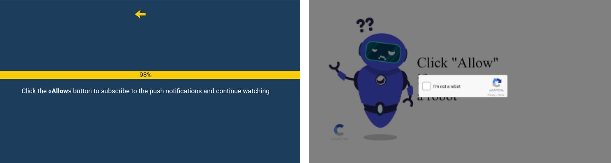
Rharcometa.com is a malicious advertising website that tricks users into allowing push notifications. It often uses fake prompts like:
- “Click Allow to continue”
- “Press Allow to watch video”
- “Tap Allow to verify you’re human”
If you click “Allow,” the site gains permission to send persistent pop-up ads directly to your device, even when your browser is closed.
These notifications are dangerous because they can lead to:
- Fake virus alerts or tech support scams
- Malware disguised as software downloads
- Adult sites and unsafe content
- Fake giveaway pages
- Cryptocurrency scams
- Spyware disguised as antivirus tools
You can read more about how scammers use fake notifications from the Cybersecurity and Infrastructure Security Agency (CISA): https://www.cisa.gov/tips/st04-013
For an example of a similar scam, check out our article on the Fake Amazon Safety Recall Notification Scam.
How Does Rharcometa.com Appear on Your Device?
Rharcometa.com doesn’t infect your device like a virus, but it can hijack your browser notification settings. Here are some common ways you might encounter it:
- Clicking ads on free streaming or gaming websites
- Downloading pirated software or fake apps
- Clicking fake download or play buttons
- Installing suspicious browser extensions
- Visiting unsafe or hacked websites
The Federal Trade Commission (FTC) provides guidance on avoiding fake tech alerts and pop-ups: https://consumer.ftc.gov/articles/how-recognize-and-avoid-tech-support-scams
If you want to learn more about other scam platforms, check out our Dexowin.bet Reviews and Crownspin.casino Reviews posts.
Is Rharcometa.com Dangerous?
Yes. Even though the website itself may not directly install malware, the notifications it sends can lead to:
- Identity theft
- Fake banking or cryptocurrency scams
- Ransomware or spyware downloads
- Social media account hacking
- Fraudulent tech support pages
- Password-stealing malware
For more information on online fraud and cybercrime, visit Europol: https://www.europol.europa.eu
Similar scams are covered in our ApplySeph.com Scam and Zetwix.com Crypto Scam Reviews posts.
How to Remove Rharcometa.com Pop-Up Ads
Removing these pop-ups depends on your browser and device. Here’s a step-by-step guide:
Google Chrome (PC and Android)
- Open Chrome and go to
chrome://settings/content/notifications - Look for rharcometa.com under “Allowed”
- Click Remove or Block
- Clear browsing data at
chrome://settings/clearBrowserData - Restart your browser
Mozilla Firefox
- Go to Settings > Privacy & Security
- Click Settings under Notifications
- Block or remove suspicious sites
- Clear cookies and site data
Microsoft Edge
- Open
edge://settings/content/notifications - Remove or block rharcometa.com
- Clear browsing data and restart
Safari (Mac and iPhone)
- Go to Preferences > Websites > Notifications
- Deny permission for suspicious sites
- Clear website data from the Privacy menu
How to Remove Rharcometa Pop-Ups on Mobile Devices
Android
- Go to Settings > Apps > Notifications
- Block notifications from unknown websites or apps
- Uninstall suspicious apps
- Scan your phone with Malwarebytes: https://www.malwarebytes.com/mobile
iPhone / iPad
- Open Settings > Notifications
- Turn off notifications for Safari or unknown apps
- Clear Safari history and website data
- Use a security app like Avast Security: https://www.avast.com/mobile
Recommended Tools to Block Pop-Ups
| Tool | Purpose | Link |
|---|---|---|
| uBlock Origin | Blocks ads and pop-ups | https://ublockorigin.com |
| AdGuard | Blocks ads on PC and mobile | https://adguard.com |
| Malwarebytes | Detects adware and malware | https://www.malwarebytes.com |
| VirusTotal | Scan links, apps, and files | https://www.virustotal.com |
How to Prevent Pop-Up Malware in the Future
- Never click “Allow” on unknown websites
- Avoid pirated streaming or download sites
- Install apps only from official stores
- Use a trusted ad blocker
- Keep your browser and antivirus up to date
- Don’t click suspicious pop-up warnings
Learn more about web safety with Google Safe Browsing: https://safebrowsing.google.com
Frequently Asked Questions (FAQ)
1. Can Rharcometa.com steal personal information?
Indirectly, yes. It can redirect you to phishing sites that collect passwords, personal data, or banking details.
2. Is blocking notifications enough?
Blocking notifications stops the spam, but scanning your device for adware is strongly recommended.
3. Will a factory reset remove the pop-ups?
Usually not necessary. Removing permissions and scanning your device is enough.
4. Can these pop-ups install malware automatically?
Yes, if you click the links or download files offered through the notifications.
Final Verdict
Receiving push notifications from Rharcometa.com is a warning sign that a scam site has gained access to your browser notifications. These alerts can lead to malware downloads, identity theft, and financial scams.
By removing notification permissions, clearing browser data, using ad blockers, and practicing safe browsing, you can stop these pop-ups and prevent future attacks.
For more scam prevention guides, check out our related posts: Fake Amazon Safety Recall Notification Scam, Dexowin.bet Reviews, and Zetwix.com Crypto Scam Reviews.
