
If you’ve been experiencing News-nuxomu.com pop-up ads, you may notice unwanted notifications, annoying redirects, and intrusive ads that appear even when you’re not browsing. This website is part of a growing trend of malicious or rogue sites that exploit browser notification permissions to display spam. In this guide, we will explain what News-nuxomu.com is, why these pop-ups appear, and step-by-step solutions to remove them.
What is News-nuxomu.com?
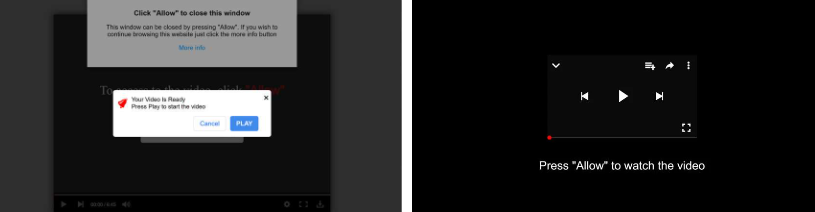
News-nuxomu.com is a deceptive website that uses social engineering techniques to get users to allow browser notifications. Often, the site displays fake prompts like “Click Allow to continue” or “Confirm you are not a robot” to trick visitors. Once permission is granted, the site can send unwanted ads, fake alerts, and potential scam links directly to your desktop or mobile device.
These pop-ups are not legitimate ads. They often lead to:
- Scam websites asking for personal information
- Fake software updates claiming your device is at risk
- Potentially harmful downloads that could infect your system with malware
For more on malicious notification sites, see PC Risk – News-nuxomu.com Ads.
Why Do News-nuxomu.com Pop-Ups Appear?
Several factors can trigger these intrusive pop-ups:
- Redirects from shady websites
Many low-quality or pirated sites redirect users to News-nuxomu.com through ads or pop-ups. - Accidental permission clicks
Clicking “Allow” when the site asks for notification permission gives it control to push notifications to your device. - Adware or Potentially Unwanted Applications (PUAs)
Hidden adware on your device can force constant redirects to News-nuxomu.com and similar malicious domains. - Browser vulnerabilities
Outdated browsers may be more susceptible to deceptive scripts and pop-ups.
For a detailed removal guide, check Adware Guru – News-nuxomu.com Removal.
Are News-nuxomu.com Pop-Ups Dangerous?
While the site itself is not classified as a virus, its pop-ups are highly risky. They can:
- Lead to phishing attacks trying to steal personal data
- Prompt fake downloads containing malware or ransomware
- Overload your browser with spam notifications and ads
- Reduce system performance due to persistent background activity
Ignoring these pop-ups is not enough — it’s important to remove the site’s access immediately.
How to Remove News-nuxomu.com Pop-Up Ads
Follow these step-by-step instructions to regain control of your browser:
1. Remove Notification Permissions
For Chrome:
- Go to
chrome://settings/content/notifications - Locate News-nuxomu.com under “Allowed”
- Click Remove
For Firefox: Settings → Privacy & Security → Permissions → Notifications → Remove News-nuxomu.com
For Edge: Settings → Cookies and site permissions → Notifications → Remove the site
Removing notification permissions stops further spam alerts from the site.
2. Clear Browser Cache and Cookies
Pop-ups may continue if browser data stores old site information. Clearing cache and cookies can help:
- Chrome: Settings → Privacy and Security → Clear browsing data → Cookies and cached files
- Firefox: Options → Privacy & Security → Cookies and Site Data → Clear Data
3. Install an Ad Blocker
Trusted ad-blockers like uBlock Origin, AdGuard, or AdBlock Plus can prevent redirects and block unwanted pop-ups from malicious websites.
4. Scan Your Device for Adware
Persistent pop-ups often indicate adware or PUAs. Use trusted security software to scan and remove threats:
- Malwarebytes – Adware removal tool
- HitmanPro – Malware scanner
- Avast Free Antivirus – Complete virus and adware protection
5. Update Your Browser
Always use the latest version of your browser. Updates patch vulnerabilities that malicious sites exploit.
How to Prevent Future Pop-Ups
- Never click Allow on unknown sites
- Install a reputable ad-blocker and antivirus
- Keep your operating system and browser updated
- Avoid visiting high-risk websites that may redirect to malicious domains
Frequently Asked Questions (FAQ)
Q1: Is News-nuxomu.com safe?
No. It is a malicious site that sends spam notifications and can redirect to scams.
Q2: How do I stop pop-ups on Chrome?
Go to Chrome settings → Notifications → Block any suspicious or unknown sites.
Q3: Can adware cause News-nuxomu.com redirects?
Yes. Adware or PUAs installed on your device may force these redirects. Use trusted antivirus software to remove them.
Q4: Will removing notifications stop the pop-ups?
Yes, but scanning for malware and clearing your cache ensures the pop-ups don’t return.
References
- Adware Guru – Remove News-nuxomu.com Ads
- PC Risk – News-nuxomu.com Ads Guide
- HowToFix Guide – Remove News-nuxomu.com Ads
- Malwarebytes Official Site
- uBlock Origin Extension
Related Scam Alerts and Reviews
- VimeWin.cc Crypto Casino Scam Review
- GKIPSF.com Scam Store Review
- Novixnero.co.in Pop-Up Ads Removal Guide
- Hugo-And-James.com Review
- How to Remove Trusted Spot Search
- Clara‑CelesteBoston.com Scam Review
- Bucks100.com $100 Starbucks Gift Card Scam
- How to Remove Harmonyboss.com Pop‑Up Ads
- Joyeria-Garcia.com Review
- Neonrush.lol Scam Warning
- GFOUK Patches Review
- Gluco Balance Supplement Review
- How to Remove Fileless-storage-s3.cc
- Aihlo.Shop Scam Store
- Fatea.shop Scam Store Review
- How to Remove SearchSuperPDF.com Redirect
- Infinitecalm.top Review
