
If your browser keeps redirecting you to Alpha-centavr.cc, displaying intrusive notifications, or opening suspicious ads automatically, your browser permissions may have been hijacked.
Alpha-centavr.cc is part of a growing wave of push-notification scams that trick users into enabling spam alerts. This comprehensive guide explains how the threat works, how to remove Alpha-centavr.cc pop-ups completely, and how to prevent similar infections in the future.
What Is Alpha-centavr.cc?


4
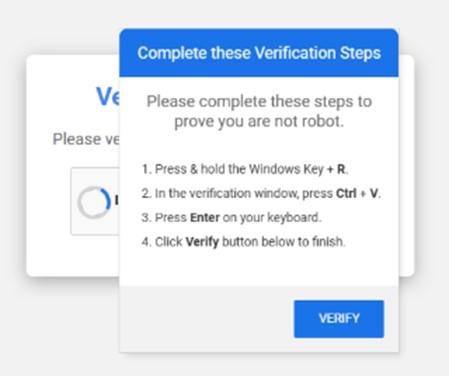
Alpha-centavr.cc is a deceptive website that abuses browser push notification features. Instead of directly infecting your device, it tricks you into clicking “Allow” on a fake prompt such as:
- “Click Allow to confirm you are not a robot”
- “Press Allow to continue”
- “Enable notifications to download your file”
Once permission is granted, the site can send unlimited spam notifications directly to your desktop or mobile device — even when you are not browsing the site.
These notifications often promote:
- Fake antivirus alerts
- Cryptocurrency scams
- Adult websites
- Phishing login pages
- Suspicious software downloads
Although Alpha-centavr.cc is not classified as a traditional virus, it is commonly associated with:
- Adware
- Potentially Unwanted Programs (PUPs)
- Browser hijackers
How Alpha-centavr.cc Infects Your Browser
You may have encountered this site through:
- Unsafe streaming websites
- Torrent platforms
- Clicking misleading ads
- Installing free software bundles
- Malicious redirects from compromised websites
Many users mistakenly believe clicking “Allow” is necessary to access content. However, legitimate websites do not require notification permissions to verify CAPTCHA or play videos.
Step-by-Step Guide to Remove Alpha-centavr.cc
Follow all steps carefully to ensure complete removal.
Step 1: Remove Alpha-centavr.cc Notification Permissions
Remove from Google Chrome
- Open Chrome.
- Click the three-dot menu in the top-right corner.
- Navigate to:
Settings → Privacy and Security → Site Settings → Notifications - Under “Allowed to send notifications,” find Alpha-centavr.cc.
- Click the three dots beside it.
- Select Remove or Block.
Official Chrome Help Page:
https://support.google.com/chrome/answer/3220216
Remove from Mozilla Firefox
- Open Firefox.
- Go to:
Settings → Privacy & Security → Permissions - Click Settings next to Notifications.
- Select Alpha-centavr.cc.
- Click Remove Website.
Official Firefox Guide:
https://support.mozilla.org/en-US/kb/push-notifications-firefox
Remove from Microsoft Edge
- Open Edge.
- Go to:
Settings → Cookies and site permissions → Notifications - Locate Alpha-centavr.cc.
- Click the three dots.
- Choose Remove.
Official Edge Support:
https://support.microsoft.com/microsoft-edge
Remove from Safari (Mac)
- Open Safari.
- Click:
Safari → Settings → Websites → Notifications - Select Alpha-centavr.cc.
- Click Deny.
Official Apple Support:
https://support.apple.com/guide/safari/manage-notifications
Step 2: Remove Suspicious Browser Extensions
Malicious extensions may re-trigger redirects.
In Chrome
- Type
chrome://extensions/in the address bar. - Remove unknown or recently installed extensions.
In Firefox
- Type
about:addonsin the address bar. - Remove unfamiliar add-ons.
If you are unsure about an extension, search its name online before removing it.
Step 3: Uninstall Suspicious Programs
Adware sometimes installs alongside free software.
On Windows
- Press Windows + R.
- Type
appwiz.cpland press Enter. - Review recently installed programs.
- Uninstall suspicious or unknown applications.
Microsoft guide:
https://support.microsoft.com/windows/uninstall-or-remove-apps-and-programs
On Mac
- Open Finder → Applications.
- Look for unfamiliar apps.
- Move suspicious programs to Trash.
- Empty the Trash and restart your Mac.
Apple guide:
https://support.apple.com/guide/mac-help/uninstall-apps
Step 4: Run a Full Malware Scan
Even after removing permissions, hidden adware components may remain.
Use a reputable security tool such as:
- Malwarebytes – https://www.malwarebytes.com
- Microsoft Defender – Built into Windows
- Avast Antivirus – https://www.avast.com
Run a full system scan, not a quick scan, for best results.
Step 5: Reset Your Browser (If Pop-Ups Continue)
If issues persist, reset your browser to default settings.
Reset Google Chrome
- Go to: Settings → Reset and clean up
- Click Restore settings to their original defaults
Official instructions:
https://support.google.com/chrome/answer/3296214
Refresh Mozilla Firefox
- Type
about:support - Click Refresh Firefox
Official guide:
https://support.mozilla.org/en-US/kb/refresh-firefox-reset-add-ons-and-settings
How to Prevent Alpha-centavr.cc and Similar Scams
Prevention is key to avoiding future notification spam.
Best practices include:
- Never click “Allow” on unknown sites
- Avoid pirated or cracked software
- Download programs only from official websites
- Keep your operating system updated
- Enable built-in browser pop-up blockers
- Use reputable antivirus protection
You may also want to read:
- How to Block Pop-Ups in Chrome, Firefox, Edge, and Safari
- Guide to Removing Adware from Windows and Mac
- How to Remove Browser Hijackers Safely
Frequently Asked Questions
Is Alpha-centavr.cc dangerous?
Yes. While it is not a traditional virus, it can redirect users to phishing pages, scam platforms, and malware downloads.
Why do Alpha-centavr.cc notifications keep coming back?
If notifications return, you may still have:
- An active browser extension
- Adware installed on your system
- A secondary malicious website permission
A full system scan usually resolves persistent issues.
Can Alpha-centavr.cc steal passwords?
The site itself sends spam notifications, but it can redirect users to phishing websites designed to steal login credentials and financial data.
Does resetting the browser remove Alpha-centavr.cc?
Yes. Resetting removes notification permissions, malicious extensions, and altered settings.
Final Verdict
Alpha-centavr.cc pop-ups are a classic push-notification scam designed to generate ad revenue and redirect users to harmful content. Fortunately, the problem is completely reversible.
By removing notification permissions, uninstalling suspicious programs, and running a full malware scan, you can eliminate Alpha-centavr.cc and restore your browser’s normal functionality.
Additional Resources
- How to Remove Browser Pop-Ups Safely
- Guide to Remove Adware from Windows and Mac
- Block Pop-Ups in Chrome, Firefox, Edge, Safari
Related Scam Alerts and Review
- Scam Detector – Lemogex.com Review
- Macquarie Bank “Rewards Alert” Scam Texts
- CogniCare Pro Supplement Review
- GlycoLean Supplement Review
- Beatrix Mode Rotterdam Review
- Trueformclo Review
