
Browser hijackers continue to be among the most common potentially unwanted programs affecting internet users worldwide. While they may not be as destructive as ransomware or banking malware, they can significantly impact browser performance, online privacy, and overall user experience.
One extension that has generated attention in cybersecurity discussions is Earth 3D New Tab. Marketed as a browser enhancement featuring beautiful Earth imagery and customizable new tab pages, the extension appears harmless at first glance. However, numerous users report unexpected browser modifications, search engine changes, and intrusive advertising after installation.
This detailed Earth 3D New Tab review examines its features, potential risks, removal process, and whether users should keep or uninstall the extension.
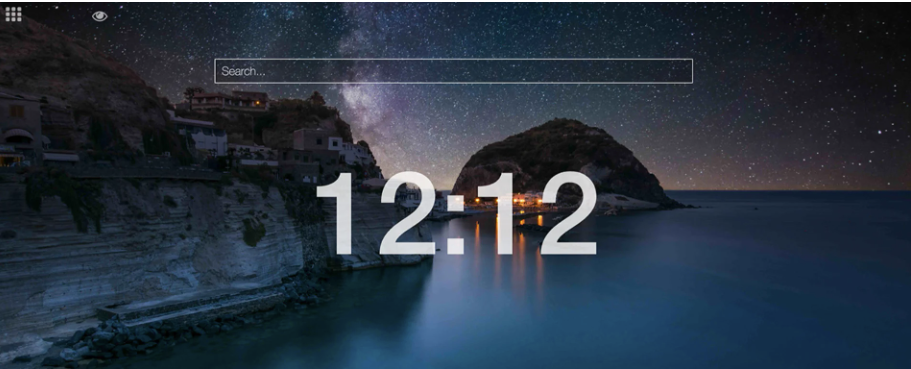
What Is Earth 3D New Tab?
Earth 3D New Tab is a browser extension designed to enhance the appearance of your browser’s new tab page through high-definition Earth wallpapers, shortcuts, widgets, and integrated search features.
The extension is commonly available for Chromium-based browsers and may be distributed through browser extension stores, software bundles, promotional downloads, and third-party websites.
Although customization tools themselves are not harmful, concerns arise when an extension modifies browser settings beyond what users expect or clearly authorize.
Why Security Experts Flag Earth 3D New Tab
Cybersecurity researchers often categorize Earth 3D New Tab as a Potentially Unwanted Program (PUP) or browser hijacker because it may:
- Modify homepage settings
- Change default search engines
- Redirect search queries
- Inject sponsored content
- Collect browsing-related information
- Generate advertising revenue through redirects
These behaviors are common among browser hijackers and can create privacy concerns for users.
How Browser Hijackers Operate
Browser hijackers typically generate revenue through traffic redirection and advertising partnerships.
After installation, they may:
- Replace browser settings.
- Redirect users through affiliate search networks.
- Display sponsored advertisements.
- Collect browsing statistics.
- Encourage installation of additional software.
Every redirected search can generate advertising revenue for extension operators.
Common Symptoms of Earth 3D New Tab Infection
You may have Earth 3D New Tab installed if you experience any of the following:
Unexpected Homepage Changes
Your preferred homepage is replaced with a new search portal or customized landing page.
Search Redirects
Searches entered into the browser address bar pass through unfamiliar websites before displaying results.
Increased Advertising
Users often report:
- Pop-up advertisements
- Sponsored search results
- Promotional banners
- Redirect advertisements
Browser Slowdowns
Browser hijackers frequently consume system resources, leading to:
- Slower startup times
- Delayed page loading
- Increased memory usage
- Browser crashes
New Extensions Appearing
Additional browser add-ons may be installed without clear notification.
How Earth 3D New Tab Gets Installed
Most users never intentionally install browser hijackers.
Common distribution channels include:
Software Bundling
Many free applications package optional browser extensions during installation.
Users who select “Quick Install” instead of “Custom Install” may unknowingly authorize additional software.
Misleading Advertisements
Fake download buttons and promotional pop-ups may encourage installation.
Third-Party Download Sites
Unofficial software repositories frequently bundle extra applications with legitimate software.
Fake Browser Updates
Some deceptive websites display warnings claiming your browser requires an urgent update.
The resulting download may install unwanted extensions instead.
Is Earth 3D New Tab Dangerous?
Earth 3D New Tab is generally not classified as high-risk malware.
However, it may expose users to several concerns:
Privacy Risks
The extension may collect:
- Search history
- Browsing behavior
- IP address information
- Browser preferences
- Device information
Security Risks
Redirects can occasionally lead users toward:
- Low-quality websites
- Phishing pages
- Scam promotions
- Misleading downloads
Performance Issues
Users may experience:
- Reduced browser speed
- Excessive advertisements
- Search disruptions
- Unwanted browser modifications
How to Remove Earth 3D New Tab Completely
Step 1. Uninstall Suspicious Programs
Windows
- Open Control Panel.
- Select Programs and Features.
- Locate Earth 3D New Tab.
- Remove the application.
Mac
- Open Applications.
- Find suspicious software.
- Move it to Trash.
- Empty Trash.
Step 2. Remove Browser Extensions
Google Chrome
- Open Extensions
- Locate Earth 3D New Tab
- Click Remove
Mozilla Firefox
- Open Add-ons Manager
- Find the extension
- Remove it
Microsoft Edge
- Open Extensions
- Locate Earth 3D New Tab
- Remove it
Step 3. Reset Browser Settings
A browser reset can restore:
- Homepage settings
- Search engine settings
- Startup preferences
- New tab configurations
Step 4. Run a Security Scan
Use reputable security software to detect and remove remaining components.
Recommended tools include:
- Malwarebytes
- Microsoft Defender
- Bitdefender
- Norton
- ESET
How to Protect Yourself from Browser Hijackers
Preventing browser hijackers is easier than removing them.
Follow these best practices:
- Download software only from official websites
- Avoid pirated software
- Use custom installation settings
- Read installation screens carefully
- Keep browsers updated
- Install reputable security software
- Review browser permissions before approving extensions
Related Security Resources
For additional browser security guidance, readers may find these resources helpful:
- Google Chrome Safety Center
- Mozilla Firefox Security Features
- Microsoft Edge Security Documentation
- Cybersecurity and Infrastructure Security Agency (CISA) Safe Browsing Guidelines
- Federal Trade Commission Consumer Security Resources
You can also link internally to:
- How to Remove Browser Hijackers
- Best Anti-Malware Software Reviews
- Common Online Scams Explained
- Browser Security Tips for Beginners
- How to Spot Fake Software Updates
Final Verdict
Earth 3D New Tab may offer attractive Earth-themed browser customization, but reports involving browser modifications, search redirects, advertising injections, and potential data collection raise concerns.
Although it is not generally considered severe malware, users who notice unexpected browser behavior should remove the extension promptly and conduct a comprehensive malware scan.
Maintaining strong browsing habits, reviewing extension permissions carefully, and downloading software only from trusted sources remain the most effective defenses against browser hijackers.
Overall Risk Assessment: Moderate
Privacy Risk: Medium
Security Risk: Low to Moderate
Recommendation: Remove if installed without clear consent or if browser settings have been altered unexpectedly.
Frequently Asked Questions
What is Earth 3D New Tab?
Earth 3D New Tab is a browser extension that replaces the default new tab page with Earth-themed wallpapers and search functionality.
Is Earth 3D New Tab a virus?
No. It is usually classified as a potentially unwanted program or browser hijacker rather than a traditional computer virus.
Why does Earth 3D New Tab keep changing my browser settings?
The extension may have permission to manage browser settings, including your homepage, search engine, and new tab page.
Can Earth 3D New Tab collect browsing data?
Depending on its permissions and privacy policy, it may collect information related to searches, browsing activity, browser configuration, and device information.
How did Earth 3D New Tab get installed?
Most users install it through bundled software packages, browser extension promotions, third-party download websites, or deceptive advertisements.
Can browser hijackers steal passwords?
Most browser hijackers focus on advertising and traffic redirection. However, any unauthorized browser modification can increase overall security risks.
Will removing Earth 3D New Tab stop redirects?
In most cases, yes. Removing the extension and resetting browser settings usually resolves redirect issues.
Is Earth 3D New Tab safe to keep?
If it changes browser settings without your permission or causes unwanted redirects, removal is recommended.
How can I prevent browser hijackers?
Download software from trusted sources, review installation options carefully, keep your browser updated, and use reliable security software.
What should I do after removing Earth 3D New Tab?
Reset browser settings, clear browser data, update your browser, and run a full malware scan to ensure no residual components remain.
Related Scam Alerts and Review
- Zeadux Crypto Casino Review 2026
- Glyvoryn Drops Review 2026
- Nozawin.com Crypto Casino Review 2026
- Rongambler.com Review 2026
- Heuvux.com Crypto Casino Review 2026
- Teavex.com Review 2026
- Easepicks Hairbrush Review 2026
- Smoke-info.com Review 2026
- Stalclearauto.shop Review 2026
